by Screens PeoPle
Share
by Screens PeoPle
Share
What Is ‘Screen Bleed’ and Is It Normal?
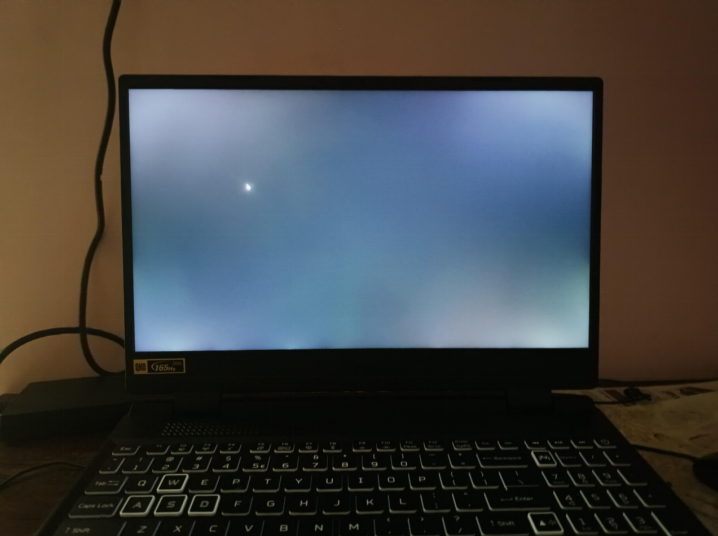
Screen bleed is light that leaks around the edges of an LCD laptop screen. A small amount can be normal, especially on dark images in a dim room. Heavy bleed is not normal when it distracts you during regular viewing.
What Does Screen Bleed Look Like?
Screen bleed usually appears as bright patches near the corners or screen edges. It shows most clearly on black backgrounds, dark movies, or loading screens.
The patches may look white, yellow, or pale blue depending on the panel. They often stay in the same place when you move your viewing angle.
Bleed is different from a bright dead pixel or a crack in the panel. A pixel problem looks like a point, while bleed looks like a larger glow.
Why Does Screen Bleed Happen?
Most laptop LCD screens use a backlight behind the image layer. Screen bleed happens when some backlight escapes unevenly through the panel edges.
Panel pressure, frame pressure, and uneven assembly can make bleed more visible. A bent lid or tight bezel can also place stress on the display.
Bleed may appear after a repair if the panel sits too tightly. It may also appear after a drop, lid twist, or heavy bag pressure.
Is Screen Bleed Normal on IPS Screens?
Minor edge glow can appear on IPS screens because of their panel design. Many users notice it only in dark rooms with brightness set very high.
IPS glow changes when you move your head or change the viewing angle. Screen bleed usually stays in one area and does not move much.
If you only notice the glow on test images, it may not matter. If it affects videos, editing, or reading, the panel may need attention.
How Can You Test Screen Bleed?
Test screen bleed in a dark room with a plain black image. Set brightness to your normal level first, then check the edges carefully.
Do not press the bezel or screen while testing because pressure can change results. Take a photo only if the camera exposure matches what your eyes see.
Very long exposure photos can make normal glow look worse than reality. Judge the issue by normal viewing, not only by extreme test conditions.
Can You Fix Screen Bleed at Home?
You can lower brightness, change viewing angle, or adjust room lighting. These steps can reduce how often bleed catches your attention.
- Reduce brightness when watching dark content in a dim room.
- Avoid pressing on the screen edges or closing the lid hard.
- Use a soft sleeve so bag pressure does not twist the lid.
- Ask for warranty support if the bleed is severe and new.
Do not loosen screws or open the bezel unless you know the model. Wrong pressure or damaged clips can make the display problem worse.
When Is Screen Bleed a Warranty Issue?
Screen bleed may become a warranty issue when it affects normal use. This is more likely when bright patches appear during movies, work, or browsing.
Take clear photos at normal brightness and include the room lighting conditions. This helps support staff understand the issue without relying on extreme tests.
Check the seller return window if the laptop or replacement screen is new. Early action can make the warranty or return process easier to handle.
If the bleed appeared after a drop, warranty coverage may be limited. Physical damage often needs paid repair or a replacement panel instead.
Frequently Asked Questions
Is Screen Bleed the Same as Backlight Glow?
No, screen bleed stays near an edge or corner in one area. Backlight glow can shift with your viewing angle on some panel types.
Does Screen Bleed Get Worse Over Time?
It can stay the same for years if the laptop avoids pressure. It may worsen after drops, lid pressure, heat, or poor repairs.
Should I Replace a Screen With Heavy Bleed?
Replace it if the bright patches affect normal work, media, or dark images. Heavy bleed often comes from panel stress that cannot be fully cleaned or adjusted.
Conclusion
Light screen bleed can be normal, but strong bleed should not disrupt daily use. Test it under normal brightness, avoid pressure, and seek repair when it stays distracting. For a worn or damaged panel, Screens People offers laptop LCD screens that can help restore clear viewing.
STAY IN THE LOOP
Subscribe to our free newsletter.
Leave A Comment
How Much Does It Cost to Fix a Cracked Laptop [...]

Can I Upgrade My Laptop Screen to a Higher Resolution [...]
Can Keyboard Keys Scratch or Mark the Screen When Closed? [...]
Does a Higher Refresh Rate (120Hz/144Hz) Matter for Non-Gamers? A [...]