by Screens PeoPle
Share
by Screens PeoPle
Share
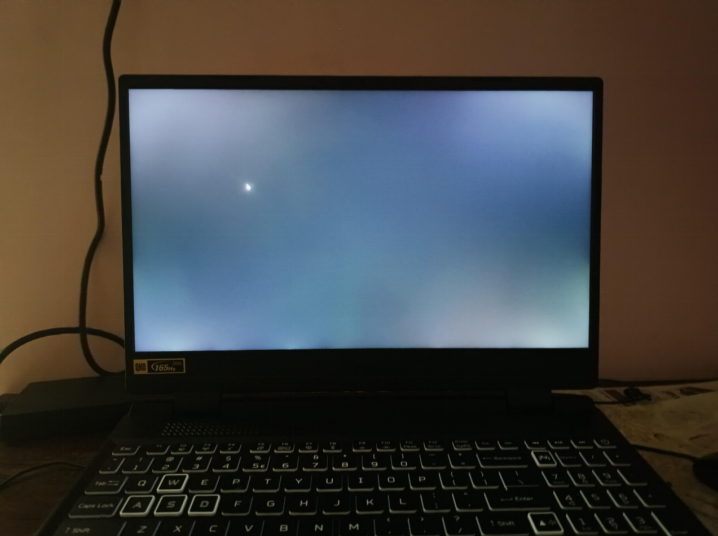
Matte vs. Glossy Screens: Which Is Better?
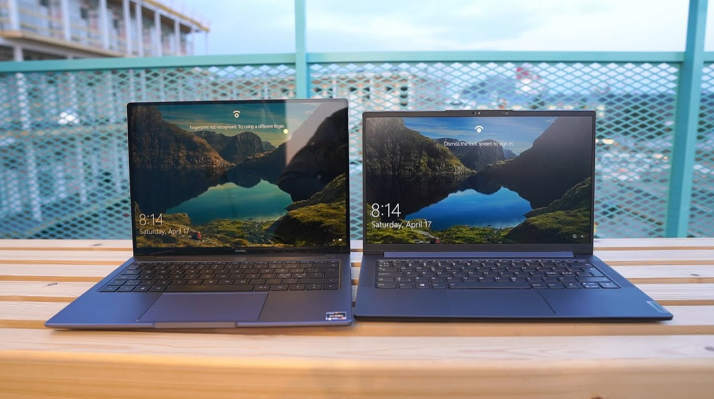
Matte screens are better for bright rooms, while glossy screens often look sharper indoors. The better choice depends on lighting, work type, and how much glare bothers you. Neither finish is best for every laptop user.
What Is a Matte Laptop Screen?
A matte laptop screen has an anti-glare surface that scatters reflected light. This surface reduces mirror-like reflections from lamps, windows, and bright rooms.
Matte screens are common on business laptops, school laptops, and outdoor-friendly models. They make text easier to read when light hits the display.
The tradeoff is that some matte coatings can soften the image slightly. Good matte screens still look clear, but cheap coatings may look grainy.
What Is a Glossy Laptop Screen?
A glossy laptop screen has a smooth surface that reflects light more directly. This finish can make colors look richer and blacks look deeper.
Glossy screens are common on touch laptops, media laptops, and some premium models. They can look excellent in rooms where you control the lighting.
The main problem is glare from windows, lamps, and bright backgrounds. Reflections can cover text, photos, and dark scenes during daily use.
Which Screen Is Better for Work?
Matte screens usually work better for offices, classrooms, travel, and shared spaces. They help when you cannot control lights, windows, or seating angles.
Glossy screens can work well for creative tasks in controlled lighting. They may show stronger contrast, which helps photos and videos look more vivid.
If you read documents for long hours, glare control matters more than shine. A clear matte screen can reduce squinting and constant angle changes.
Which Screen Is Better for Color and Media?
Glossy screens often make movies and photos appear more vibrant at first glance. They can help blacks look deeper because reflections stay sharper and cleaner.
Matte screens can still offer excellent color when the panel quality is high. The screen technology and color range matter more than the finish alone.
For color work, check color coverage, brightness, contrast, and viewing angles. A glossy low-quality panel will not beat a matte high-quality IPS screen.
How Should You Choose Between Matte and Glossy?
Choose based on where you use the laptop most during the week. Your room lighting and screen angle should guide the decision.
- Choose matte for bright offices, classrooms, travel, and window-heavy rooms.
- Choose glossy for media use in rooms with controlled light.
- Choose matte if reflections make reading text tiring or slow.
- Choose glossy if touch support and vivid image quality matter more.
Also consider cleaning, because glossy screens show fingerprints more easily. Matte screens can hide smudges better, but they still need gentle cleaning.
What Should You Check Before Replacing the Finish?
Check whether your laptop model came with both matte and glossy screen options. If it did, finding a compatible replacement may be easier.
Match the panel size, connector, brackets, brightness, and resolution before ordering. A different finish still needs the same physical and electrical fit.
Think about where the laptop spends most of its time each week. A glossy screen may look great at home but struggle in bright offices.
If glare causes daily problems, a true matte replacement may help more. A film protector can help, but it may not look as clean.
Check return rules before changing panels because finish preferences are very personal.
Frequently Asked Questions
Can I Change Glossy to Matte?
You may use a matte screen protector, but it can reduce clarity. A full screen replacement may be better when your model supports matte panels.
Are Touchscreens Usually Glossy?
Yes, many touchscreens use glossy glass because it supports touch better. Some touch models add anti-reflective layers, but reflections can still appear.
Does Matte Mean Lower Quality?
No, matte only describes the surface finish, not the panel quality. A matte IPS screen can be much better than a cheap glossy panel.
Conclusion
Matte screens control glare better, while glossy screens can look richer in controlled light. Match the finish to your room, work, and tolerance for reflections. If you need a different finish or replacement panel, Screens People can help you compare laptop LCD screens for your device.
STAY IN THE LOOP
Subscribe to our free newsletter.
Leave A Comment
You can enable Night Light or blue light filters in [...]
How Do I Change My Laptop Screen Resolution? You can [...]

Can a Cracked Laptop Screen Be Fixed Without Replacing It? [...]