by Screens PeoPle
Share
by Screens PeoPle
Share

Can a Cracked Laptop Screen Be Fixed Without Replacing It?
No, a cracked laptop screen almost always requires a full panel replacement rather than a true repair.
Many laptop screens crack from everyday accidents that catch many owners off guard. A short drop onto a hard floor can create long lines and dark spots, and too much pressure inside a backpack can create dark patches on the display.
At that point, many people ask whether they can restore normal function without replacement.
Experience and expert advice show that true repair rarely happens without a new panel. True repair of a cracked display panel requires installing a new one in its place.
What Happens When a Laptop Screen Cracks?
Laptop displays contain multiple layers that work together to produce very clear images.
- The outermost layer protects the delicate components underneath the other layers in the screen.
- The liquid crystal layer controls light to form each pixel on the display.
- A backlight makes the picture visible to the user during normal operation of the laptop.
A crack that reaches the liquid crystal layer allows fluid to shift or escape quickly, and it also breaks the tiny electrical connections that control pixel colors on the screen.
These changes create permanent black spots and lines across the entire display area. Unresponsive areas appear where the hardware has suffered physical harm from the crack, and no simple adjustment can fix that physical harm.
Why Patching or Filling Cracks Does Not Work
Some users experiment with clear tape or nail polish on small cracks in the screen. These materials hold loose glass pieces in place and slow the spreading of damage, yet none of these steps reconnect the severed circuits inside the panel. None of these steps realign the liquid crystals that have been disturbed by the crack.
The display continues to show the same problems whenever the laptop powers on fully. Professional technicians do not recommend these methods for anything beyond very temporary protection.
When Does Replacement Become the Only Practical Option?
Repair shops and manufacturers state that cracked display panels require replacement in most situations. The panel arrives from the factory as one sealed assembly that cannot be opened easily, and breaking it apart for repair would destroy more components than it could possibly save.
- Many two-in-one laptops or tablets separate the touch digitizer from the main display.
- In those models, technicians might replace only the touch layer when the image stays clear.
- Most traditional laptop screens bond all the layers together in a very permanent way.
- This design makes partial repairs impossible without specialized factory equipment that shops do not have.
How Can External Displays and Protective Steps Help in the Meantime?
Owners who need their laptop right away can connect it to a separate monitor or TV.
- An HDMI cable carries the signal so the external screen shows the full desktop clearly, while the built-in display stays dark.
- Placing a high-quality screen protector over the cracked surface area is another useful step. Several layers of clear packing tape can also cover the cracked surface for protection.
- The protector shields the rest of the screen from further scratches during daily use and contains any small glass pieces that might otherwise fall out.
These measures keep the device usable for basic tasks but leave original problems visible when someone opens the laptop lid to use the screen.
What Does Professional Screen Replacement Involve?
A repair technician follows a clear, multi-step process to swap out a cracked panel safely:
- Confirm that the crack affects only the display panel itself.
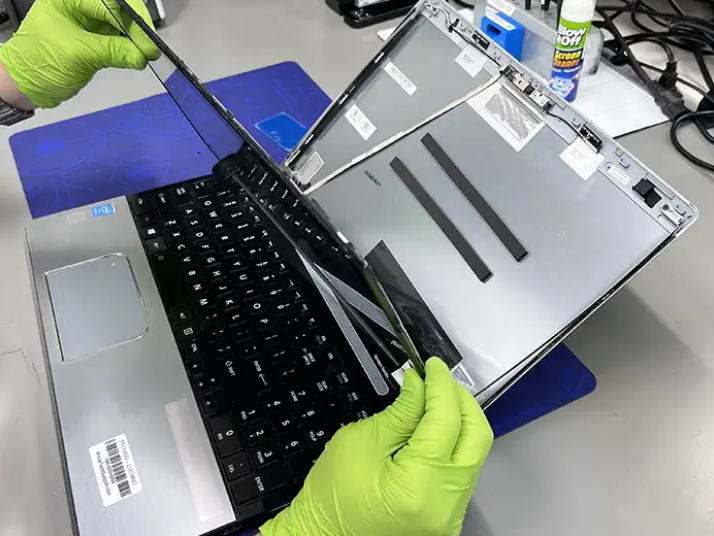
- Remove the plastic bezel around the screen using small tools carefully.
- Disconnect the video cable and the backlight power wire.
- Slide the old panel out of its frame without causing damage to other parts.
- Install the new panel by reversing these steps in the opposite order of removal.
Many common laptop models allow the entire job to finish in 30 to 60 minutes. The correct replacement part must arrive before the technician can start the repair work.
What Are the Costs and Benefits of Repair?
Screen replacement prices vary based on the laptop brand, screen size, and features such as touch support or high resolution levels.
- Basic panels for older models often cost less than $100 for the part alone.
- Newer or premium laptops can require parts that cost 2 or 3 times that amount.
- Labor charges at a shop typically add another $50 to $150 to the total cost.
Owners should compare this total against the current value of their laptop before deciding. A machine more than 4 or 5 years old may not justify the full expense, since a similar used or refurbished unit often costs about the same as the repair.
Should You Choose Professional Help or a Personal Project?
Some people prefer to order a replacement screen and perform the swap at home themselves. Many repair websites and video platforms provide detailed guides for specific laptop models.
- Success requires the right screwdriver set and plastic pry tools for safe disassembly.
- Patience is needed to avoid breaking plastic clips or scratching surfaces during the process.
- Ordering the exact screen that matches the original specifications remains the most important step.
- Wrong resolution, connector style, or mounting points can lead to serious compatibility problems that prevent the laptop from working.
Restoring Your Laptop After Screen Damage
A cracked laptop screen almost always needs a new panel before it can display images properly. Temporary steps such as external monitors and protective coverings allow continued use while arrangements for replacement move forward. Professional repair services handle the technical details and provide tested results for the owner.
Individuals who enjoy hands-on work can attempt the job themselves with proper preparation. In either path, the goal remains the same: a working screen returns the laptop to full usefulness for work, study, and entertainment.
Screens People supplies quality LCD panels for many laptop models that fit well. Their catalog helps users locate the correct part quickly to restore the device. Explore the available options through Screens People at the provided link for your needs.
STAY IN THE LOOP
Subscribe to our free newsletter.
Leave A Comment
A 4K screen can be worth it on some 13-inch [...]
You find the exact replacement part number for your screen [...]
You can enable Night Light or blue light filters in [...]
How Do I Change My Laptop Screen Resolution? You can [...]