by Screens PeoPle
Share
by Screens PeoPle
Share
Can Keyboard Keys Scratch or Mark the Screen When Closed?
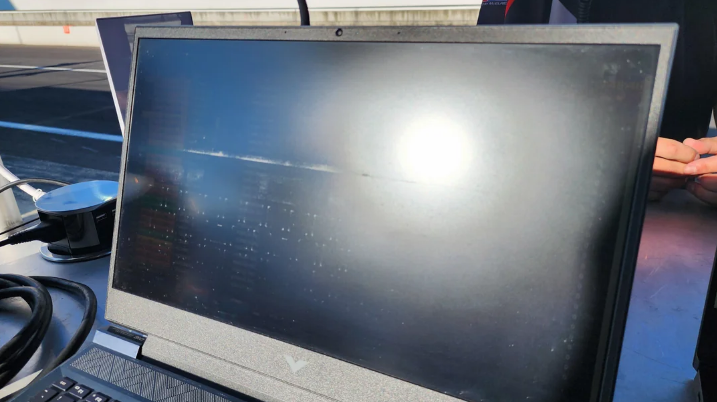
Yes, keyboard keys can scratch or mark the laptop screen when the lid is closed. Most marks come from pressure, dust, skin oil, or a tight laptop design. Light marks may wipe away, but real scratches can stay on the screen.
Why Do Keyboard Marks Happen?
When you close a laptop, the keys sit very near the display surface. A small gap is normal, but pressure inside bags can push both parts together.
Dust, crumbs, and dry skin can act like grit inside a case. The marks often match the shape of keys, key edges, or the trackpad.
This problem often appears after travel, daily commuting, or storage under heavy items. A thin lid can bend slightly, so the screen touches the keyboard more often.
Are Keyboard Marks the Same as Scratches?
Keyboard marks are not always scratches, even when they look serious at first. Many marks come from oil transfer, fine dust, or pressure on the coating.
A scratch usually catches light from several angles and does not wipe away. A mark may fade after careful cleaning with a microfiber cloth and safe cleaner.
Avoid pressing hard while cleaning because pressure can make the damage worse. Never use paper towels, glass cleaner, alcohol wipes, or rough cloth on laptop screens.
How Can You Prevent Marks on the Screen?
Simple habits can lower the risk of keyboard marks during normal laptop use. The main goal is to keep grit away and reduce pressure.
- Clean the keyboard before closing the laptop after long typing sessions.
- Use a thin microfiber cloth made for screens during travel.
- Keep chargers, books, and heavy items away from the laptop lid.
- Use a padded sleeve when placing the laptop inside a bag.
Do not use a thick keyboard cover unless the laptop maker allows it. A thick cover can reduce the gap and press keys harder against the display.
What Should You Do if Marks Appear?
Start with a dry microfiber cloth and wipe in soft, straight motions. If marks remain, lightly dampen the cloth with distilled water or screen cleaner.
Turn the laptop off before cleaning, so smudges and scratches show more clearly. Let the screen dry before closing the lid or turning the laptop on again.
If the mark stays after careful cleaning, inspect it under a bright light. A deep scratch usually needs screen replacement if it affects daily viewing comfort.
When Should You Consider Screen Replacement?
Consider replacement when scratches cross text, photos, or work areas on the display. Replacement also makes sense when pressure marks appear with dark spots or bright patches.
A cracked coating can spread if the lid keeps pressing against the keys. In that case, prevention will not solve the damage already on the panel.
What Mistakes Should You Avoid?
Do not close the laptop with pens, papers, earbuds, or adapters inside. Even a thin object can press the panel harder than normal keyboard contact.
Avoid cleaning the screen with strong sprays because they can damage coatings. Spray cleaner onto the cloth first if the cleaner is safe for screens.
Do not ignore repeated marks that return after every trip or commute. Repeated contact means the lid, bag pressure, or cover thickness needs attention.
If your laptop uses a camera bump or raised keys, check the maker guidance. Some thin models need extra care because the lid gap is very small.
Frequently Asked Questions
Can a Keyboard Cover Cause Screen Marks?
Yes, a keyboard cover can cause marks if it is too thick. It can press against the screen when the lid closes tightly.
Should I Put a Cloth Between the Keyboard and Screen?
A very thin microfiber cloth can help during travel and storage. Remove it before using the laptop, and keep it clean.
Do Screen Protectors Stop Keyboard Marks?
A screen protector may reduce light rubbing, but it will not stop pressure damage. It can also affect clarity if the protector quality is low.
Conclusion
Keyboard keys can mark a laptop screen when pressure, dust, and oil build up. Clean the keyboard often, use a thin cloth during travel, and avoid heavy pressure on the lid. If the screen already has permanent scratches or pressure damage, Screens People can help you compare replacement laptop screens and choose a suitable option.
STAY IN THE LOOP
Subscribe to our free newsletter.
Leave A Comment
Does a Higher Refresh Rate (120Hz/144Hz) Matter for Non-Gamers? A [...]
Why Does My Laptop Screen Look Dim Even at Full [...]
Why Is My Laptop Screen Black but the Keyboard Lights [...]