by Screens PeoPle
Share
by Screens PeoPle
Share
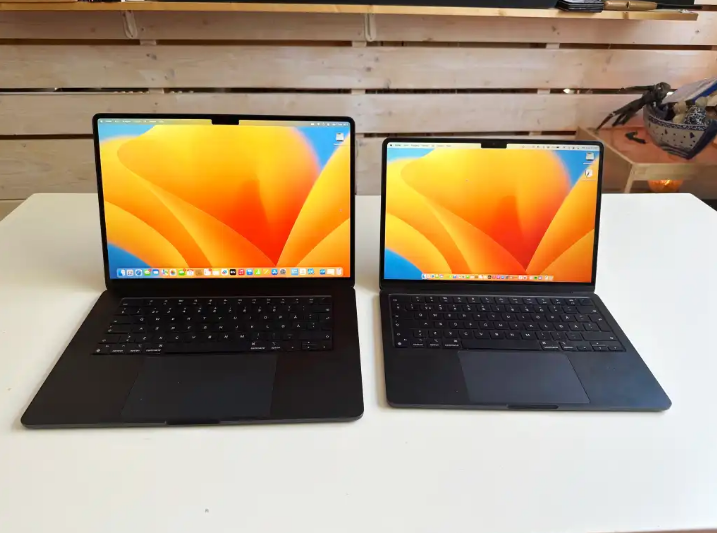
A 4K screen can be worth it on some 13-inch and 15-inch laptops. It gives very sharp text and detailed images, but it can cost more battery. Many users may get better value from a good QHD or Full HD screen.
What Does 4K Mean on a Laptop?
4K usually means a resolution close to 3840 x 2160 pixels. That is much higher than Full HD, which is 1920 x 1080 pixels.
On a small laptop screen, those extra pixels make text and images very sharp. The benefit is strongest when the panel also has good brightness and color.
Resolution alone does not guarantee a better screen for daily use. A dull 4K panel can look worse than a bright, color-rich lower-resolution panel.
Is 4K Worth It on a 13-Inch Laptop?
On a 13-inch laptop, 4K can look extremely sharp but may be excessive. The screen is small, so many users need scaling to read comfortably.
Scaling makes text and buttons larger while keeping the high pixel count. It improves comfort, but it reduces the extra workspace you might expect.
Battery life often drops on small 4K laptops because more pixels need power. A strong 1920 x 1200 or QHD screen may feel more balanced.
Is 4K Worth It on a 15-Inch Laptop?
On a 15-inch laptop, 4K can make more sense for visual work. The larger screen lets you see more detail without making everything too small.
Photo editors, video editors, and design users may benefit from the extra pixels. Text can also look very smooth when scaling is set correctly.
For general office work, a good 1080p, 1200p, or QHD panel may be enough. These options often cost less and use less battery during daily tasks.
What Are the Downsides of 4K?
The main downsides are cost, battery drain, heat, and scaling problems. Some older apps can look blurry or awkward when scaling is active.
Games and high-resolution video editing may need more graphics power at 4K. Even non-gamers can notice shorter battery life during normal screen use.
Repair cost may also be higher because 4K panels can cost more. Compatibility matters if you replace a lower-resolution screen with a 4K panel.
Who Should Avoid 4K on a Laptop?
Avoid 4K if battery life matters more than extreme sharpness. Students, travelers, and field workers may value longer unplugged use more.
Avoid it if your apps do not scale well on high-resolution displays. Blurry menus or tiny controls can slow work and cause frustration.
Avoid it when the laptop has weak graphics hardware for your workload. Driving more pixels can make some tasks feel slower or less smooth.
If cost matters, compare a strong QHD screen before choosing 4K. Many users find QHD sharp enough on both 13-inch and 15-inch laptops.
Frequently Asked Questions
Is 4K Better Than OLED?
4K describes resolution, while OLED describes the screen technology. A 4K IPS screen and an OLED screen can look very different.
Can I Lower a 4K Screen to 1080p?
You can lower the resolution, but native 4K usually looks sharper. Use scaling first if text or buttons feel too small.
Does 4K Always Use More Battery?
In most laptops, 4K uses more battery than lower-resolution options. Brightness, panel type, and workload also affect battery life.
Conclusion
4K is worth it when sharp detail matters more than cost and battery life. On 13-inch laptops, QHD or 1200p often feels more practical. On 15-inch laptops, 4K makes more sense for visual work, and Screens People can help you compare laptop LCD screens before replacing or upgrading.
STAY IN THE LOOP
Subscribe to our free newsletter.
Leave A Comment

Vertical or horizontal lines on a laptop screen happen when [...]

Replacing a laptop screen yourself can be easy or difficult [...]
You find the exact replacement part number for your screen [...]
You can enable Night Light or blue light filters in [...]