by Screens PeoPle
Share
by Screens PeoPle
Share
What Is the Safest Way to Clean a Laptop Screen?
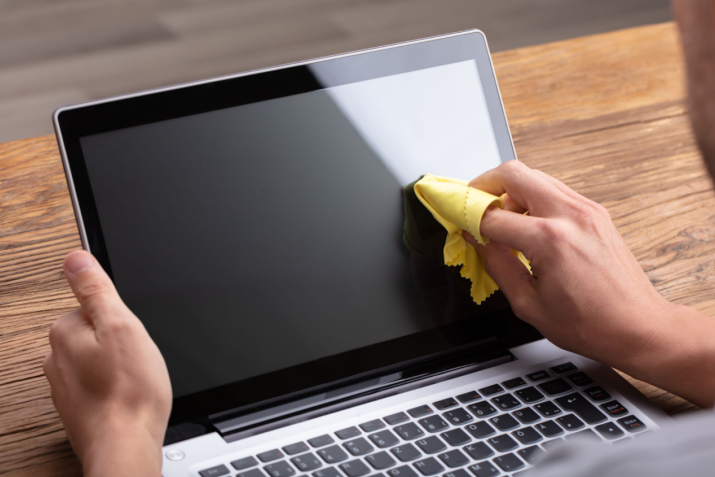
The safest way to clean a laptop screen is to power it down, remove loose dust with compressed air, and wipe gently with a microfiber cloth and distilled water, avoiding household cleaners, paper towels, and excess pressure.
Laptop screens collect dust and skin oils during normal daily use at work. These substances reduce the sharpness of text and the brightness of colors on the display.
Eyes strain more when the display lacks clarity during work or entertainment time. Restoring the picture requires a method that removes buildup without harming films on the surface. These films reduce reflections and slow new fingerprint formation on modern laptop screens.
Damage to the films creates uneven appearance and faster soiling on the screen quickly. Safe cleaning protects the display appearance and performance over the life of the laptop.
What Risks Come from Incorrect Cleaning Methods?
Rough cleaning methods cause damage that shows after repeated cleanings on the laptop screen.
- Paper towels and cotton cloths leave fine scratches because their fibers are stiff and rough. The scratches collect more dirt and become visible under angled light.
- Window and kitchen cleaners contain ammonia that breaks down the oil-repelling coating fast. The coating wears away after several uses, and fingerprints then appear quickly while the screen looks worn after each cleaning session.
Full panel replacement becomes necessary when the surface reaches this damaged state over time. The oil-repelling layer exists to make daily contact easier to manage, and once it thins, every touch leaves a visible mark that grows harder to clear.
What Supplies Avoid Damage During Cleaning?
The right supplies prevent damage during cleaning of the laptop screen.
- Microfiber cloths:Have very fine fibers that lift particles without abrasion. Rough cloths drag dirt and create new marks because they lack the split strands for gentle contact.
- Distilled water:Supplies moisture for tough spots because it leaves no mineral spots after drying. Tap water often dries with cloudy patches that require extra passes to remove.
- Laptop-specific screen cleaners:Work well when they contain no alcohol or ammonia. Alcohol thins coatings over time and creates dull patches that never recover after use.
- A second dry cloth:Finishes the job by removing any moisture from the screen surface.
What Is the Correct Cleaning Sequence?
Follow these steps in order for a safe and effective clean:
- Power down the laptop and unplug the power cord. Remove any connected peripherals at the same time. The dark screen reveals dirt without glare, and the cool temperature prevents residues from setting.
- Place the laptop on a stable surface with the screen facing up.
- Use short bursts of compressed air from several inches away to clear loose dust and grit. Loose particles left in place turn into abrasives during the wipe that follows.
- Fold the microfiber cloth into a thick pad and start at one corner of the screen. Move across the screen in straight horizontal passes with light pressure only.
- Overlap each pass to cover the full area without any gaps. Added force compresses the layers inside the panel and risks bright or dark spots later, while parallel lines follow the panel structure and leave no missed bands in the center area.
- For remaining oil marks, touch one corner of the cloth to a fine mist of distilled water and wipe the mark in the same straight motion used before.
- Follow immediately with a dry section of the cloth to absorb the water from the surface. Work section by section so moisture never sits long enough to reach the panel edges.
- Let the screen sit open for several minutes so any remaining moisture evaporates naturally. Powering on too soon can create streaks when heat and dampness interact on the surface.
What Mistakes Lead to Permanent Issues?
Household items cause most permanent problems on laptop screens during regular cleaning sessions.
- Facial tissues and paper towels cut grooves into the coating with their stiff fibers. These grooves trap dirt and grow more noticeable with continued use.
- Disinfectant wipes and glass cleaners dissolve the protective oil-repelling layer with their solvents. The layer disappears and fingerprints stick instead of wiping away during normal contact.
- Heavy pressure on a single spot squeezes the liquid crystal layer between the glass sheets. The cells shift or sustain damage that creates fixed patterns of light or darkness on screen.
- Circular rubbing wears the surface in swirling patterns that catch light differently from the rest.
- A warm, active display makes particles bond more tightly because the slight heat softens the coating.
How Do You Maintain Ongoing Screen Care?
Frequent light cleaning prevents heavy buildup from forming in the first place.
- A dry microfiber pass every few days removes new dust and oils before they bond to the surface.
- Keeping the lid closed during storage limits additional airborne particles from landing on the screen.
- A fitted sleeve adds another barrier in busy or dusty environments around the home or office.
- A replaceable screen protector absorbs everyday contact marks and can be changed when it shows wear, keeping the original display underneath new.
When Does Replacement Become Necessary?
Marks that remain after proper cleaning indicate worn coatings or physical panel damage. Additional wiping at this stage only adds to the existing surface disruption over time. A full screen replacement restores clear viewing and ends the cycle of difficult cleaning.
The method described above removes dirt from the laptop screen without harm to any layer. Simple supplies and a light, steady technique deliver lasting results for the display over years. Regular use of this process delays the need for replacement of the laptop screen.
When cleaning no longer improves the image, replacement offers the best path forward. Screens People carries laptop LCD screens for many models and budgets in their online store. You can explore their options to find good screens easily.
STAY IN THE LOOP
Subscribe to our free newsletter.
Leave A Comment
A 4K screen can be worth it on some 13-inch [...]
You find the exact replacement part number for your screen [...]
You can enable Night Light or blue light filters in [...]
How Do I Change My Laptop Screen Resolution? You can [...]