by Screens PeoPle
Share
by Screens PeoPle
Share

Can I Upgrade My Laptop Screen to a Higher Resolution or Refresh Rate?
You can upgrade some laptop screens to a higher resolution or refresh rate. The upgrade only works when the laptop hardware supports the new panel. Screen size alone is not enough to confirm compatibility.
What Controls Laptop Screen Upgrade Options?
Upgrade options depend on the panel size, connector, cable, mount, and firmware. Many laptop screens look similar but use different electrical and physical designs.
Most modern laptops use eDP connectors, but the pin count can differ. A 30-pin cable may not support the same features as a 40-pin cable.
The laptop graphics system must also support the target resolution and refresh rate. Some models limit screen choices through firmware or cable design.
Can You Upgrade to a Higher Resolution?
A higher-resolution upgrade may work when the model has factory options using that resolution. For example, some laptops ship with both Full HD and 4K screen choices.
If your exact model supports both choices, the upgrade may be possible. You may still need a different display cable, bracket, or panel revision.
Upgrading without checking compatibility can lead to no image, flicker, or wrong brightness. It can also create scaling issues if the screen size is small.
Can You Upgrade to a Higher Refresh Rate?
A higher-refresh upgrade may work when the laptop supports that panel and cable. The screen, cable, graphics system, and firmware must all handle the rate.
A 144Hz panel will not run properly if the cable cannot carry the signal. Some laptops need more eDP lanes for higher refresh rates or resolutions.
Heat and battery life can also change after a higher-refresh upgrade. The screen may use more power, especially at high brightness.
What Should You Check Before Ordering?
Check the full panel model number from the existing screen when possible. This is more reliable than searching only by laptop name.
You should also review the connector location, pin count, panel size, thickness, and mounting tabs. A matching screen must fit both electrically and physically.
- Confirm the current panel model before buying a replacement.
- Check whether your laptop sold with the desired screen option.
- Match connector type, pin count, and connector location carefully.
- Confirm mounting style, panel thickness, and cable support.
If you are unsure, ask a screen supplier before ordering the panel. A small mismatch can stop the display from working at all.
What Risks Come With a Screen Upgrade?
The main risk is buying a panel that does not work in your laptop. The laptop may show a black screen, flicker, or display wrong colors.
Some upgrades can also reduce battery life or increase heat during heavy use. Higher brightness, resolution, and refresh rate can all use more power.
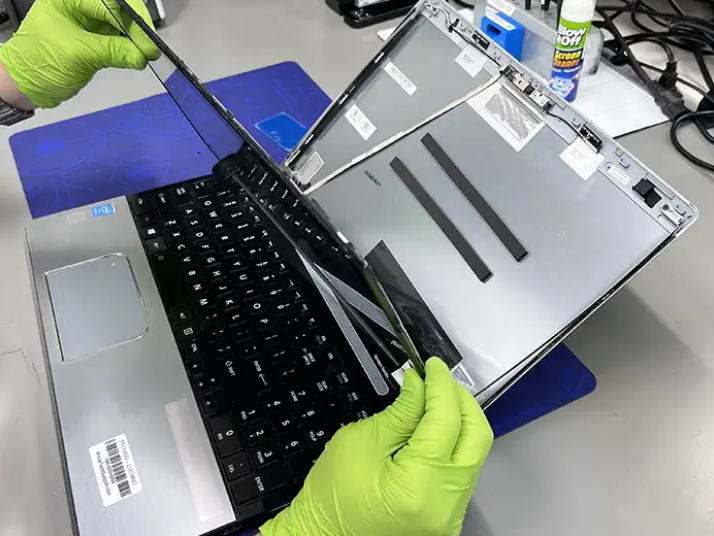
Warranty coverage may also matter if the laptop is still covered. Opening the lid assembly can damage clips, cables, or the original panel.
How Should You Plan the Upgrade Safely?
Start by writing down the exact laptop model and current panel number. Photos of the connector and mounting area can also help confirm details.
Compare the desired panel with factory parts lists when those lists are available. Factory options often show which cables and brackets match the upgrade.
Order from a supplier that understands laptop screen compatibility, not only screen size. A helpful supplier can confirm details before you open the laptop.
If the laptop is valuable, consider professional installation for the first upgrade. The lid area is thin, and display cables can tear easily.
Frequently Asked Questions
Can I Upgrade From 60Hz to 120Hz?
Sometimes, but only when the laptop supports the panel and cable requirements. Check factory screen options and the current cable before buying.
Can I Upgrade From 1080p to 4K?
Sometimes, especially when the same model sold with a 4K option. You may need the correct cable and a compatible 4K panel.
Is a Screen Upgrade Worth It?
It is worth it when compatibility is clear and the benefit matters daily. If compatibility is uncertain, a standard replacement is often the safer choice.
Conclusion
Laptop screen upgrades can work, but they need careful compatibility checks first. Match the panel, cable, connector, mount, and factory screen options before ordering. For a safer replacement or upgrade path, Screens People can help you compare laptop LCD screens for your exact laptop model.
STAY IN THE LOOP
Subscribe to our free newsletter.
Leave A Comment

Vertical or horizontal lines on a laptop screen happen when [...]

Replacing a laptop screen yourself can be easy or difficult [...]
A 4K screen can be worth it on some 13-inch [...]
You find the exact replacement part number for your screen [...]